Essay sales leads
Outbound Prospecting Workflows in Salesforce CRM
Unify your prospecting workflows to stop data silos from breaking automation.
Outbound prospecting in Salesforce fails when the CRM operates as a collection of disconnected tools rather than one unified motion. Reps spend time on data entry that automation should handle, sequences fire from external tools that Salesforce never receives data back from, and sales teams rarely agree on what should trigger a prospect entering, pausing, or exiting a workflow.
The underlying problem is not that outbound prospecting no longer works as a channel. B2B buyers still take meetings with sellers who reach out cold, and outbound remains a reliable source of pipeline for teams that run it well. The problem is that the Salesforce configuration underneath the outbound motion is frequently broken in predictable ways: object model mismatches that silently break automation, sequencing tools operating outside CRM visibility, and workflow logic that was never defined clearly enough to automate in the first place.
Why outbound prospecting in Salesforce breaks
If you ask any rep what is wrong with their outbound setup, you will get the same three answers in some order. Manual data entry consumes time that should go to selling. Leads, contacts, and accounts do not link up correctly, so routing sends deals to the wrong person and reports contain gaps. And sequences run from a separate tool that Salesforce never receives data back from, so the CRM has no visibility into what is actually happening to a prospect.
A sequence and a workflow are not the same thing, and most teams conflate them. A sequence sends outreach. A workflow governs what happens around the sending: when a prospect enters, when they pause, when they exit. Conflating the two leads teams to buy a sequencing tool expecting it to fix a workflow design problem, which it will not do. It will only send faster into the same underlying mess.
None of this means outbound is ineffective as a channel. What no longer works is untargeted outreach: large lists with no research behind them, sent through a tool that has no integration with the CRM. The channel functions. The configuration underneath it is what fails.
How the object model drives workflow decisions
Salesforce runs on a defined hierarchy: a Lead gets qualified into a Contact, that Contact links to an Account, and eventually an Opportunity gets created off that Account. Every workflow trigger, every routing rule, and every sequence enrollment keys off object type. Misclassify a record, for example a Contact gets created when it should have remained a Lead, and the automation chain that was supposed to fire simply does not. No error message, no alert. It silently skips the step. Pipeline reporting has the same vulnerability: mix Lead and Contact records carelessly and funnel analytics develop gaps that take weeks to notice and longer to explain.
Then there is the Activities layer, which covers Tasks and Events, the record of every call, email, and LinkedIn touch a rep logs. This is the raw material Einstein uses for scoring and reporting. Einstein Lead Scoring assigns a numeric score based on machine learning pattern matching against historical conversions, but the model only knows what reps actually entered into Salesforce. A call summary sitting in a shared document or a note left in a messaging tool is invisible to it entirely.
That constraint applies across every AI feature Salesforce ships, whether scoring, generative email drafting, or conversation intelligence: the output quality is directly limited by what reps record in the CRM. Poor data input produces confidently wrong scores and recommendations.
The five stages of an outbound workflow
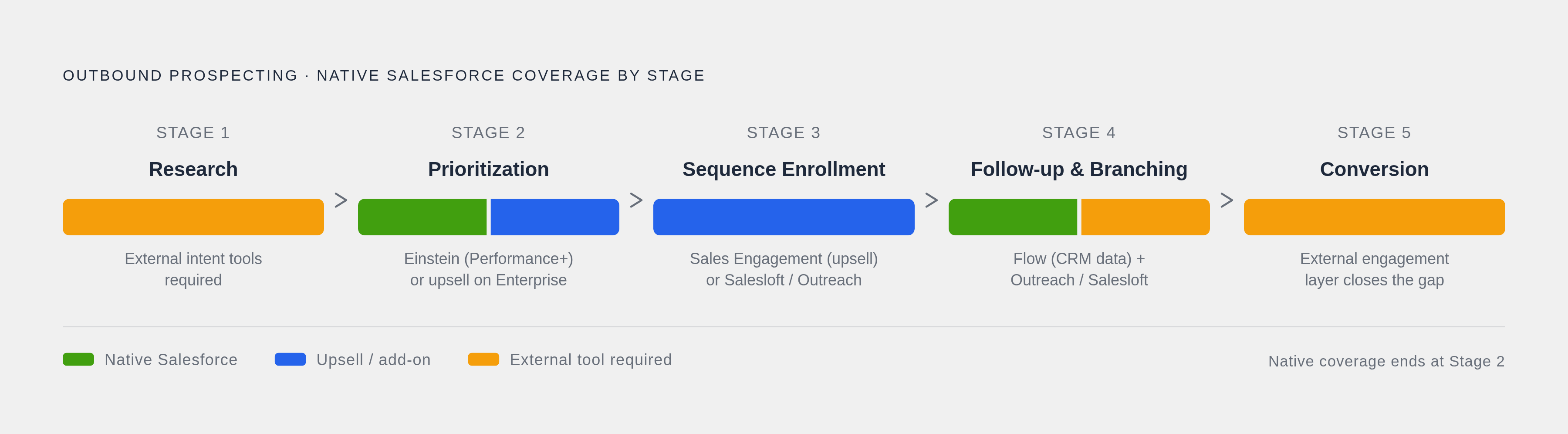
Break outbound into five stages and Salesforce covers some completely, some partially, and leaves real gaps in others.
Stage 1, research, involves finding organizations that match the target profile using public financials, recent news, and technology stack signals. Account records hold firmographic data, and custom fields can capture whatever qualifies as ICP criteria for a given team. What Salesforce will not do on its own is identify anonymous website visitors, pull live intent signals from the open web, or flag which accounts are actively in-market. That requires a third-party integration.
Stage 2, prioritization, ranks accounts by buying signals such as funding rounds, leadership changes, and hiring surges. Einstein Lead Scoring can surface high-potential leads here, but it requires Sales Cloud Einstein, which is included in Performance and Unlimited editions, available as a paid add-on on Enterprise, and unavailable on Professional or below. Without Einstein access, scoring happens manually through custom fields or by importing scores from a data vendor.
Stage 3, sequence enrollment and first touch: the core CRM is not a sequencing tool without additional products. Sequencing lives behind an upsell in Sales Engagement, formerly High Velocity Sales, or gets handled entirely outside Salesforce by platforms like Salesloft or Outreach. A workflow rule or a Flow can create a Task, assign it, and trigger a single email, but multi-step cadences with conditional branching logic require one of those add-ons or an external platform integrated into Salesforce.
Stage 4, follow-up and branching, is where the workflow logic either holds up or collapses. Branching decisions key off prospect behavior: opened the email but did not reply, connected on a call, booked a meeting, or went silent. Salesforce Flow handles branching that depends on CRM data. Behavioral triggers from actual email activity, including opens and replies, live in the engagement layer of tools like Outreach, Salesloft, or Reply.io. Account-level coordination is also required here: if one contact engages, outreach to their colleagues at the same account should pause or shift, which requires account-level logic rather than rules sitting only on individual contact records.
If you ask any rep what is wrong with their outbound setup, you will get the same three answers in some order.
Agentforce and Einstein AI for outbound prospecting
Einstein is not one feature. It covers three distinct capability types across the workflow. Predictive AI produces the Lead Scoring score from Stage 2. Generative AI, through Einstein GPT, drafts personalized outreach copy from data sitting in the CRM record, reducing the time reps spend writing individual emails. Agentic AI, through Agentforce, executes workflow steps autonomously without a rep manually triggering each one.
The Agentforce SDR Agent handles early-cycle work: personalized outbound emails, threading replies, sharing calendar links, and booking meetings directly. It reaches out via email from inside Salesforce and is built specifically for outbound motions where the team is initiating contact rather than responding to inbound interest.
There is also a prospecting-focused agent, sometimes called Hunter, that builds prioritized target lists by pulling from CRM data, intent signals, and external sources. The ZoomInfo MCP integration illustrates how that gets extended: it connects ZoomInfo's GTM Context Graph directly into the agent's data layer, giving the agent access to signals that do not exist natively in Salesforce.
Agentforce only sees what is inside Salesforce's data environment. It cannot identify anonymous website visitors, pull intent signals from outside the CRM independently, or orchestrate a multi-channel campaign across email, phone, and LinkedIn without integrations handling those connections. An SDR agent also reflects whatever ICP definition and routing rules a human configured into it. A vague ICP produces a confidently wrong campaign running at full speed.
Tools that fill native Salesforce outbound gaps
Most SDR and AE teams run the same three-part stack underneath Salesforce: the CRM as the system of record, a contact database for verified data Salesforce does not generate on its own, and a sequencer for multi-step conditional cadences that Sales Cloud does not support natively at any meaningful depth.
On the contact data side, options divide by what they are built for. ZoomInfo carries one of the largest B2B contact and intent databases available, with deep firmographic and technographic data plus org-chart mapping for buying committees, and it integrates natively into Salesforce without providing prioritization or sequencing on its own. Apollo.io bundles a contact database with sequencing in a single platform and offers a usable free tier, making it a common starting point for teams building outbound from scratch before moving to ZoomInfo paired with Outreach or Salesloft. LinkedIn Sales Navigator provides real-time job-change alerts and over 50 search filters, and it is the standard tool for reps who prospect primarily through social channels. Clay runs waterfall enrichment across dozens of sources with custom scoring logic and works best for teams building highly specific prospect lists once a sequencer is already in place. Lusha covers verified direct dials and emails for individual reps and small teams that need fast lookups, and Seamless.ai is oriented toward high search volume for teams running high-velocity outbound rather than deep enrichment.
The sequencing layer sits above the contact data layer. Outreach offers an advanced sequence builder with conditional branching, deep Salesforce integration, and conversation intelligence, with pricing running roughly $100 to $160-plus per user monthly depending on tier, and it fits enterprise teams running complex multi-step sequences. Salesloft provides an intuitive cadence builder with strong activity tracking and AI-assisted personalization, with custom pricing, and tends to serve SDR teams that need simpler cadence building at high volume. Salesloft launched its own native Conversation Intelligence in July 2026, competing directly with Outreach on that capability. Reply.io runs multichannel sequences across email, phone, and LinkedIn with an AI SDR called Jason AI that handles replies and books meetings, and it also integrates with Salesforce.
A few platforms do not fit neatly into either category. Nooks aggregates signal-based prospecting data from CRM activity, web behavior, LinkedIn, call transcripts, and third-party intent, and feeds prospects directly into AI sequencing and dialing without a handoff between separate tools. Amplemarket runs a full-stack model that combines a native contact database, multichannel engagement, buying-signal intelligence, and a workflow automation layer built on Triggers, Filters, Paths, and Actions.
Signal-based triggers versus fixed-schedule cadences
The conventional outbound model is straightforward: a rep builds a list, loads it into a cadence, and the sequence fires on a fixed schedule regardless of what the prospect is doing. Day three, email two, whether the prospect has opened anything or not.
Signal-based outbound replaces the calendar trigger with a behavioral or intent signal: a website visit, a job change, a funding announcement, or a shift in technology stack. Reaching out because a prospect was just promoted into a budget-holding role is a meaningfully different action than reaching out because the calendar indicates it is time to send.
That shift changes how the workflow must be constructed inside Salesforce. The entry condition for a sequence becomes a CRM field update or an external signal event rather than a scheduled interval. The Flow logic must check current state at the moment it executes, not only at the moment the prospect was first enrolled. A contact who has already replied since a signal fired should not receive the same next-step email as one who has gone silent, and the workflow needs to recognize that difference in real time. Account-level signals raise the same issue at a broader scope: a single signal on one contact frequently needs to reshape outreach strategy for other contacts at that account, not only trigger a one-to-one sequence on the individual record.
Scheduled cadences remain useful when the alternative is doing nothing and when the team lacks the signal infrastructure to trigger on behavior. But treating a calendar-based send and a signal-driven send as equivalent triggers is a fundamental design error that produces an outbound motion that generates activity without generating results.
Notes
- The 7 Best Sales Prospecting Tools in 2026
Provided details on Nooks as a signal-based prospecting and AI sequencing platform used in the tools comparison section.
- 9 Best Salesforce Prospecting Tools for 2026
Provided information on Reply.io's multichannel sequencing and AI SDR Jason AI capabilities described in the sequencing tools section.
- Best Outbound Sales Automation Tools 2026: 10 Compared
Provided details on Amplemarket's full-stack model combining contact database, multichannel engagement, and workflow automation layers.
- https://pipeline.zoominfo.com/sales/salesforce-agentforce-prospecting-agent-zoominfo
Described the ZoomInfo MCP integration with Agentforce's prospecting agent and its GTM Context Graph data layer.
- https://www.salesforce.com/sales/ai-sales-agent/outbound/
Described the Agentforce SDR Agent's outbound capabilities including personalized emails, threading replies, and booking meetings.
- The Outbound Execution Problem Inside Salesforce | Convoso
Informed the article's framing of core Salesforce outbound execution problems including sequencing tools operating outside CRM visibility.
- https://www.salesforce.com/news/stories/agentforce-sales-announcement/
Provided background on Agentforce's outbound sales agent announcement and its role in autonomous outbound workflow execution.
- https://www.default.com/post/salesforce-flow-building-visual-workflows-in-salesforce
Informed the article's explanation of Salesforce Flow handling branching logic dependent on CRM data in outbound workflows.