Essay CRM
Types of CRM Software and When to Use Each
Match your CRM type to the actual problem your team is stuck on right now.
Most teams aren't choosing between CRM and no CRM anymore. At this point, 91% of companies with more than 11 employees already use one. The real decision (the one that actually determines whether you get value or just pay a subscription fee) is which type of CRM you're running, and whether it matches the problem you actually have.
That mismatch is more common than vendors want to admit. And it's not about features. It's about fit.
The market has largely settled on three functional categories: operational, analytical, and collaborative. Some frameworks add a fourth (strategic CRM), and Salesforce's own documentation gives it real estate. But strategic CRM describes a posture more than a tool type. It means putting long-term customer lifetime value at the center of every business decision. Useful context, but not especially helpful when you're trying to figure out what to buy this quarter.
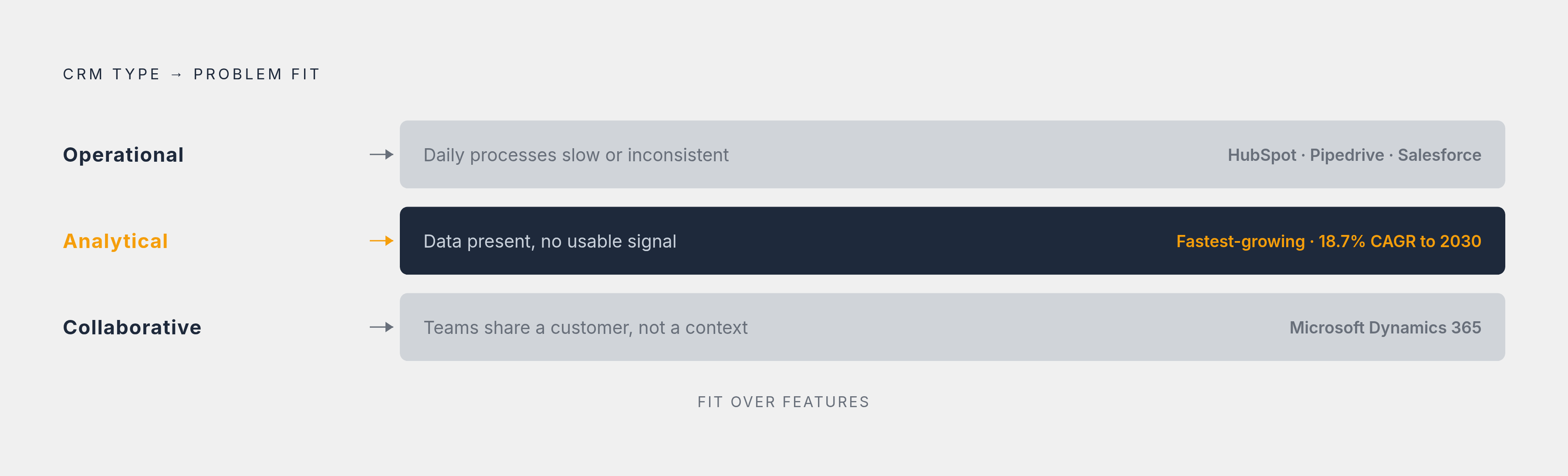
The three-type model works because it maps to three distinct problems:
- Operational: daily processes are slow, inconsistent, or eating your team's time
- Analytical: the data is there, but no one can turn it into a usable signal
- Collaborative: different departments are working the same customer with no shared context. And the customer is noticing.
Worth saying upfront: most major platforms, Salesforce, HubSpot, Microsoft Dynamics 365, blend all three types. This taxonomy describes what a platform emphasizes, not what it excludes. Knowing the emphasis tells you where a platform runs deepest, and where you'll eventually be papering over gaps with workarounds.
The right question isn't "which features does this tool have?" It's "which problem is my team actually stuck on right now?"
Operational CRM: when your process is the bottleneck
Operational CRM automates and streamlines the day-to-day work of customer-facing teams. Sales, marketing, and service. The goal is throughput and consistency. Not insight. Just getting the right things done, reliably, without someone manually shepherding every step across a spreadsheet and a prayer.
What it actually does:
- Sales automation: lead scoring, pipeline tracking, automated follow-up sequences, task triggers when a deal moves stages
- Marketing automation: email nurture campaigns, segmented sends, personalized content. Without someone manually building a list every time.
- Service automation: inquiry routing, satisfaction surveys, agent-assist tools that surface the customer's history before the rep even picks up
The signal that this is your problem is pretty blunt. Your reps are spending hours on data entry instead of selling. Marketing sends the same message to everyone because there's no workflow to do otherwise. Service tickets fall through the cracks because routing is still a manual handoff.
If any of those land, you have a process problem.
Salesforce has published data showing Sales Cloud users report a 27% boost in win rate, a 34% increase in sales revenue, and a 52% increase in lead volume. Vendor-published numbers like those reflect best-case implementations, not the median experience, so treat them accordingly. But even discounting generously, the direction is clear: these are process-efficiency gains, not insight gains. That distinction tells you exactly what operational CRM is built to move.
Sales teams, marketing ops, and customer service departments are the core audience here. Honestly, most small and midsize businesses will find everything they need in operational CRM without ever needing to go deeper. HubSpot CRM and Pipedrive are solid picks for SMBs who want pipeline clarity without a lot of complexity. Keap suits smaller teams running simpler workflows. Salesforce Sales Cloud sits at the enterprise end of this same category.
What operational CRM won't do: it'll tell you that a deal closed. It won't tell you why your close rate is quietly dropping in one segment. And it won't help three departments stop giving the same customer three different answers. Those are different problems entirely.
Analytical CRM: when you have data but not direction
Here's what this type actually looks like in practice. Say you run an outdoor gear shop. Your operational CRM tells you that someone bought hiking boots. Useful. Your analytical CRM tells you that customers who buy hiking boots come back for trekking poles within about three months — like clockwork, season after season, as reliable as the weather turning cold. So you build a follow-up campaign timed to that window, and repeat purchases start happening. Ones the team had no reason to anticipate before the data surfaced the pattern.
That's the job. Analytical CRM collects and analyzes customer data to surface trends and predictions that humans would miss scanning rows in a spreadsheet. The goal is decision quality, not process speed.
What it actually does:
- Customer segmentation: groups customers by behavior, not just demographics, so your messaging is actually targeted
- Sales forecasting: predicts future pipeline performance from historical patterns, which replaces a lot of gut-feel projection
- Touchpoint and friction analysis: finds where in the customer journey momentum stalls
- Machine learning-assisted targeting: surfaces optimal next actions from datasets too large for manual review
The signal that this is your problem: you're sitting on a large, growing customer database but personalizing at a low rate. Churn is happening, but nobody can identify which customers are at risk before they leave. Campaign performance swings wildly quarter to quarter and the post-mortems never really explain it.
If those sound familiar, you don't have a process problem. You have a signal problem.
CRM analytics is reportedly the fastest-growing functional segment in the category, with some analysts projecting 18.7% CAGR through 2030. That kind of decimal-point precision in a long-range forecast is always a little suspicious, and you shouldn't anchor too hard to any single projection. But the general direction tracks. Demand for insight tools is growing faster than demand for process tools, largely because a lot of companies have already solved the process layer and are now sitting on mountains of data they genuinely cannot use.
Analytical CRM is primarily a fit for larger businesses with substantial data volumes. Smaller companies often lack the data density to get reliable signal. The algorithms need enough data to find patterns worth acting on. Without that, you're paying for dashboards that confirm what you already suspected.
One thing worth sitting with: analytical CRM generates insight, and insight that nobody acts on is just a nice report. If the sales and service teams aren't working from the same customer picture, the finding never becomes an experience. That's where the next type matters.
Some frameworks add a fourth (strategic CRM), and Salesforce's own documentation gives it real estate.
Collaborative CRM: when the handoff between teams is breaking the customer relationship
This is the most under-diagnosed problem in CRM selection. Not because it's rare. Because teams assume more automation or more data will fix it.
It won't.
Collaborative CRM is built to share customer context across every team that touches the customer. Sales, marketing, and service all see the same history. Not their own siloed version of it.
Two structural pieces drive this:
- Interaction management: tracks every communication between the business and the customer, regardless of which team initiated it
- Channel management: governs how communication flows across email, phone, chat, and social, so no channel operates in isolation
The signal that this is your problem: a customer explains their issue to support, who has no idea what sales promised. Marketing sends a renewal offer to someone who already churned and filed a complaint. Two reps from different teams give the same account contradictory information because each team's view is incomplete.
These aren't data problems. They're access and ownership problems. And from the customer's side, it feels like the company simply doesn't know who they are.
I've seen this play out enough times that the pattern is almost boring at this point. Someone calls into support after a complex sales process, and the support rep has a completely blank slate. The customer ends up re-explaining everything the sales team already documented. Twice. It stops feeling like a business interaction and starts feeling like playing telephone with people who've never met — every handoff drops a little more signal, and by the end the customer is just a stranger explaining themselves to another stranger. Multiply that experience across hundreds of customers and you've got a retention problem that no amount of pipeline automation is going to fix.
Organizations where multiple customer-facing teams, including sales, service, marketing, and account management, currently operate from separate systems are the clearest fit here. Also companies growing through department expansion, where handoffs that didn't exist at ten people become a real liability at a hundred. That transition point sneaks up on you faster than you'd expect.
Microsoft Dynamics 365 is the clearest reference point in this category. Its tight integration with Teams, Outlook, and the broader Microsoft 365 stack makes cross-departmental collaboration a native behavior rather than something bolted on after the fact.
Worth being clear about what collaborative CRM doesn't fix: if the underlying process is broken, sharing a broken workflow across more teams doesn't solve the workflow. It just spreads the problem more efficiently. More people have access to the mess.
How the three types interact in practice, and where hybrid platforms fit
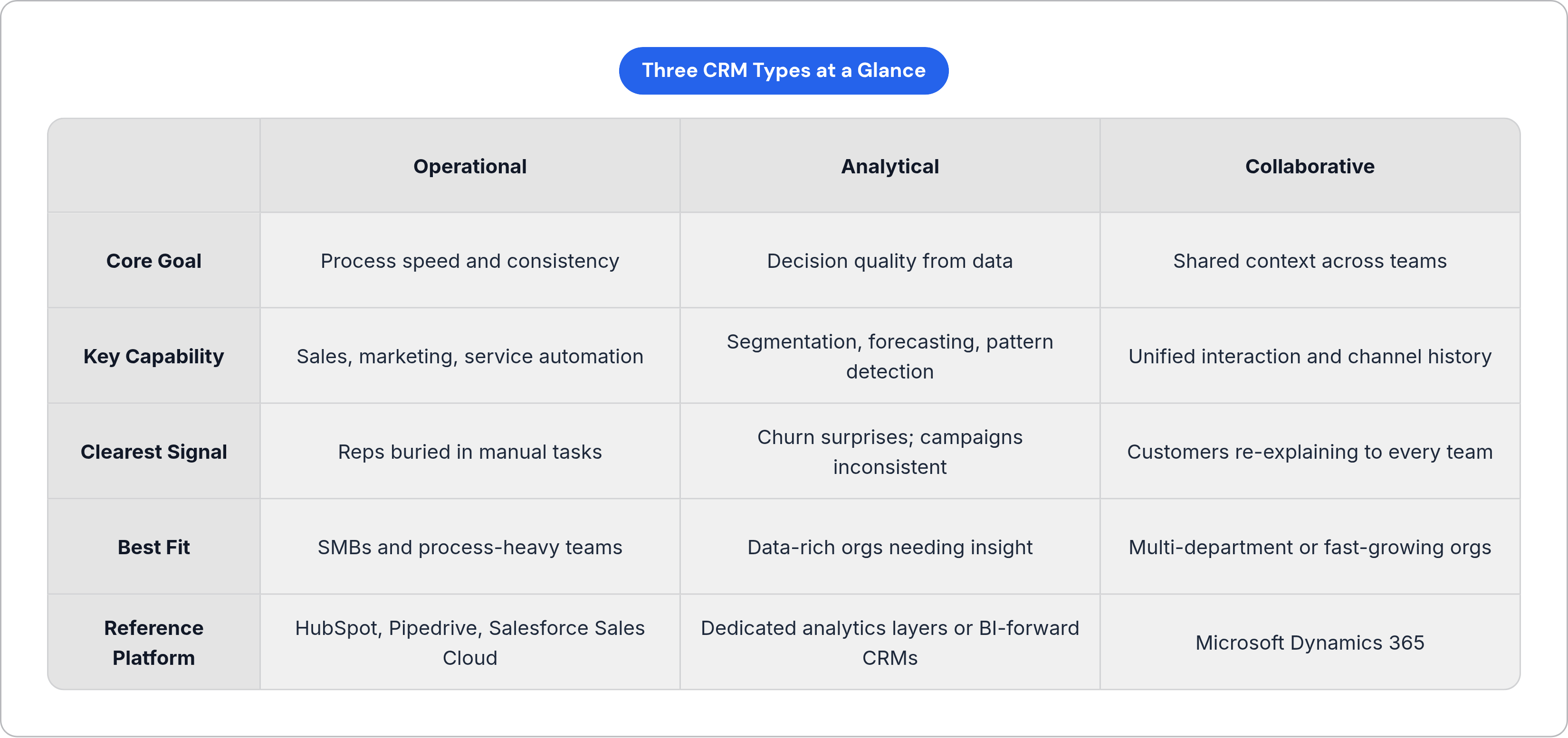
Most mature platforms aren't purely one type. Salesforce, HubSpot, and Microsoft Dynamics 365 each incorporate operational, analytical, and collaborative capabilities at different tiers. The taxonomy is still useful because it describes emphasis. What a platform was built around shows up in its UX, its default reports, and where its integrations run deepest. You can usually feel it within the first hour of a demo, if you know what to look for.
There's also a fairly predictable sequence in how teams grow into these types. Most start with operational CRM because process efficiency is the earliest and most visible pain. Analytical needs emerge as data accumulates and leadership wants to move from reactive to predictive. Collaborative needs become acute when growth creates departmental complexity, and a problem that didn't exist at ten people becomes a retention liability at a hundred.
Strategic CRM sits above all of this. It describes a company that has organized its entire strategy around long-term customer lifetime value. That's common in financial services, telecoms, and subscription businesses where retention economics dominate. But it's a strategic orientation, not a software purchase. No vendor is going to sell you strategic CRM in a box.
One thing that rarely gets enough air time in platform conversations: the integration layer. As businesses add CRM functionality across types, the connectors between the CRM and the rest of the stack (support tools, marketing platforms, product databases) often become the rate-limiting factor. That cost is almost invisible in the initial vendor conversation. It becomes very visible about six months into implementation when you're the one maintaining it.
The shift toward cloud-based deployment is also making fuller-featured CRM accessible to smaller organizations for the first time. The hybrid model is no longer enterprise-only. That's a genuine change from five years ago, and it's worth factoring into your evaluation.
Matching your current situation to the right starting point
Stop asking "what features do we need?" Ask "what is actually breaking right now?"
Three diagnostic paths that actually hold up in practice:
If your team is losing time to manual tasks, missing follow-ups, or running inconsistent processes: Start with operational CRM. Focus your evaluation on automation depth, pipeline management, and ease of adoption for non-technical users.
If you have data but can't predict churn, can't explain why campaigns perform inconsistently, or can't segment reliably: Prioritize analytical CRM, or at minimum strong analytical features within a broader platform. Focus on reporting flexibility, segmentation tools, and forecasting models.
If customers are experiencing inconsistency across teams, if handoffs are creating churn, or if departments are working from different versions of the same account: Collaborative CRM is the lever. Focus on cross-team visibility, integration with the communication tools already in use, and shared history access.
A mistake that comes up constantly: buying the platform with the most capabilities rather than the one that most directly addresses the current bottleneck. Research suggests CRM can return over eight dollars for every dollar invested. But that's an average across successful implementations. Mismatched implementations drag that number down, sometimes well below zero once you factor in the cost of switching platforms later. Nobody budgets for that. Everybody eventually pays it.
Before signing anything, look hard at how the CRM connects to the tools already in your stack. The ongoing cost of maintaining integrations is almost always invisible in the initial vendor conversation. It becomes a real operational burden once you're past implementation and the vendor's onboarding team has moved on to their next client.
Pick the type that addresses the thing that's actually broken. The rest is details.
Notes
- https://getvoip.com/blog/crm-software-examples/
Provided the Salesforce Sales Cloud statistics on sales revenue and lead volume increases cited in the operational CRM section.
- https://www.insightly.com/blog/blog-crm-types/
Provided the framework of three functional CRM categories (operational, analytical, collaborative) referenced early in the article.
- https://www.cxtoday.com/crm/the-top-crm-software-vendors-in-2025-what-makes-each-one-enterprise-ready/
Provided the statistic that 91% of companies with more than 11 employees use a CRM.
- https://www.nextiva.com/blog/types-of-crm.html
Supported the discussion of strategic CRM as a fourth framework category beyond the core three types.
- https://www.expertmarket.com/crm/types
Supported the point that most major platforms blend all three CRM types rather than representing a single pure category.
- https://brainstreamtechnolabs.com/operational-vs-analytical-vs-collaborative-crm/
Provided grounding for the three-type model mapped to three distinct operational problems described in the article's introduction.