Essay CRM
HubSpot Free CRM Capabilities and Upgrade Thresholds
New accounts hit a 1,000-contact ceiling within days of importing existing data.
The HubSpot free CRM is not a demo. It is not a trial with a countdown timer. It is a real, functional CRM that includes contacts, companies, deals, tickets, a live chat widget, meeting scheduling, email tracking, and a handful of marketing tools right out of the box. For a lot of early-stage teams, it is genuinely enough. But it has ceilings, and those ceilings are specific, they are engineered, and they hit at exactly the wrong moment — like a trapdoor hidden under a welcome mat. Knowing where they are before you hit them is worth a lot more than figuring it out mid-campaign.
The 1,000-contact limit that most guides still get wrong
Here is the thing most articles about HubSpot's free plan get wrong: they still cite a contact limit that no longer exists.
In September 2024, HubSpot reduced the stored-contact ceiling for new free accounts from one million contacts down to one thousand. That is not a typo. One thousand contacts. A reduction by a factor of a thousand.
The vast majority of blog posts and comparison guides out there were written before that change and have not been updated. If you are reading something that says "store up to a million contacts for free," that information applied to accounts created before September 2024. If you signed up after that date, you are operating under an entirely different plan.
How to find your actual limit: Go to Settings, then Account & Billing, then Usage & Limits. That number is your number. Do not trust a third-party source for this. The plan has changed too many times for outside sources to be reliable.
Now, a distinction worth making clearly before this gets confusing:
- Stored contacts are everything in your CRM database. The 1,000 cap is a ceiling on how many total records your free account can hold.
- Marketing contacts are the specific records you can email and target with ads. Paid Marketing Hub tiers bill based on this number. Non-marketing contacts don't count toward that billing tier.
The 1,000 limit affects your stored-contact ceiling. Not the marketing-contact billing model specifically. But practically speaking, for a new free account, both become relevant fast.
Here is the real problem. A small business with any history at all — a few years of collected leads, a trade show list, an old newsletter export — can blow past 1,000 contacts on the day they import their data. The ceiling is not a slow creep. For a lot of teams, it is a wall they walk into on setup. Think of it like moving into a new apartment and discovering the closet only fits one coat.
The other hard limits that create real operational friction
The contact ceiling gets the most attention because it is the most dramatic change. But there are other limits that cause more day-to-day friction once you are actually using the platform.
Users. The free plan now includes two seats. Any team of three immediately has a problem. Worth noting: HubSpot now separates View-Only seats (free, but read-only) from Core seats (which require payment for editing access). Some permissions that were free before now require a paid Core seat to use.
Marketing email sends. Two thousand per month, total, for the whole account. That sounds like a lot until you do the math: a list of 500 contacts, emailed once a week, exhausts that in four sends. And when you hit the cap, HubSpot stops sending. No warning to the recipient. The email just doesn't go. A silent failure with real revenue implications.
One-to-one sales emails. Two hundred outbound emails per user per day via connected inbox. That is a separate limit from the marketing email cap, and it matters for SDR-heavy teams.
Pipelines. One. If you sell more than one product, serve more than one customer type, or run more than one sales motion, you are forcing everything through a single funnel. This distorts your reporting and creates workflow friction for your reps.
Custom properties. Ten per object. Any real CRM data model — lead source, industry, MRR, renewal date, churn risk score — blows past ten properties within the first week of a serious implementation.
Active lists. Five. These are dynamic segments that update automatically as contacts meet or leave certain criteria. Five active lists is not enough to run any real segmented nurture strategy.
Automation. Zero multi-step workflows. You can send one automated email after a form submission. That is the ceiling. No behavior-based triggers, no lead rotation, no lifecycle stage updates. Everything else is manual.
Reporting. You get pre-built reports. You cannot build cross-object custom reports (like revenue by lead source by region) without a paid hub. The dashboards exist. The depth does not.
Branding. Every form, email, chatbot, landing page, and quote shows "Powered by HubSpot." Your customer-facing assets carry a third-party logo. For early-stage teams this is fine. For everyone else, it becomes a problem.
Custom objects. Not available until Enterprise. If your business tracks non-standard data (service agreements, project phases, equipment configurations), you either shoehorn it into the wrong fields or maintain a separate spreadsheet alongside your CRM. Neither is a good answer.
Deeper integrations. The HubSpot App Marketplace is large and meaningful access comes with the free tier. But Salesforce integration is gated at Professional. Custom object mapping and workflow triggers in third-party integrations often require a paid hub as well.
In September 2024, HubSpot reduced the stored-contact ceiling for new free accounts from one million contacts down to one thousand.
When each limit typically becomes the breaking point
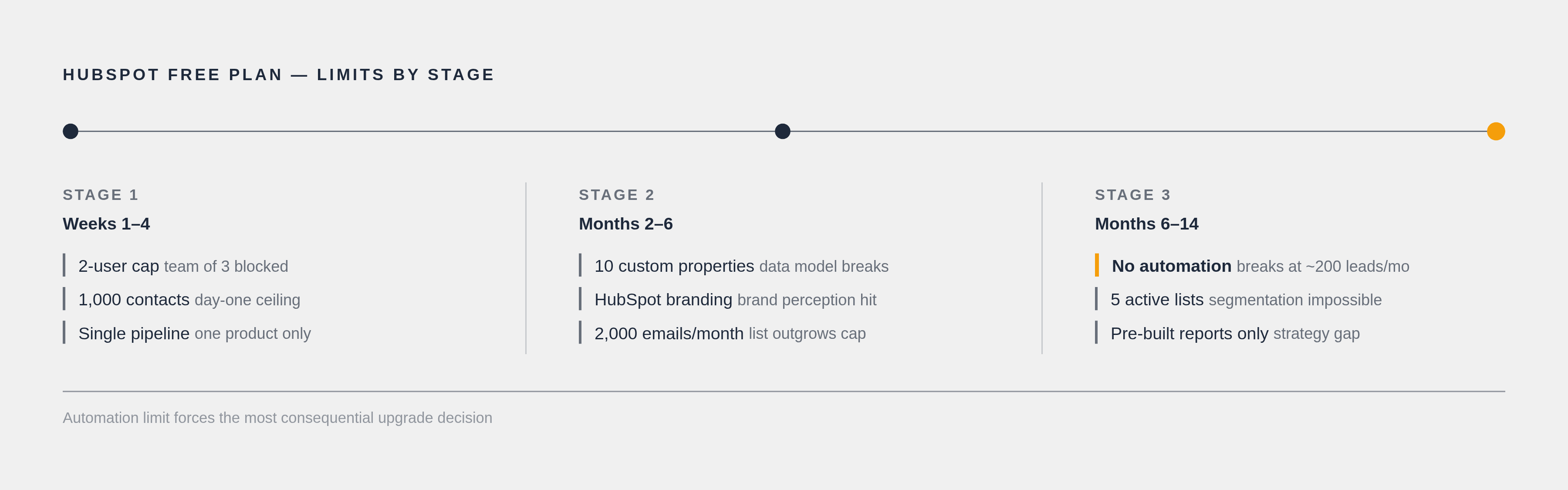
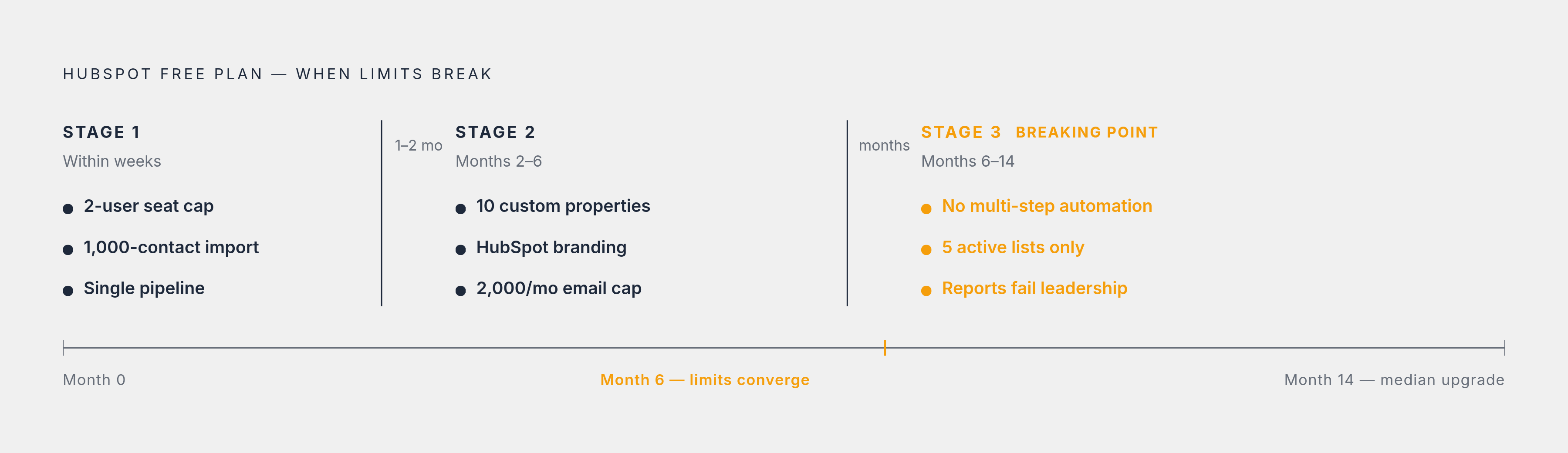
The free plan does not break all at once. It breaks in stages, and the stages are pretty predictable.
Earliest triggers (often within weeks):
- The two-user cap hits immediately for any team of three.
- The 1,000-contact ceiling hits on day one for businesses importing an existing list.
- The single pipeline becomes a constraint for any team selling more than one thing.
Mid-stage triggers (typically months two through six):
- Ten custom properties runs out once someone actually builds a real data model.
- The HubSpot branding on customer-facing assets becomes a brand perception issue as the business matures and starts caring how it looks.
- The 2,000 monthly email cap gets hit once a list reaches a few hundred contacts and the send cadence picks up.
Later triggers (months six through fourteen, as volume scales):
- The automation gap becomes a real operations problem. Following up manually on twenty leads a month is manageable. At two hundred leads a month, it falls apart — like trying to bail out a rowboat with a teaspoon.
- Five active lists stops being enough once any kind of segmented campaign strategy starts.
- Pre-defined reports stop answering the actual strategic questions leadership is asking.
The median HubSpot free user upgrades after about fourteen months. Most SMBs outgrow the free plan somewhere in the six-to-twelve-month window. The pattern is consistent: the free plan works genuinely well at the start, and the limits are positioned to become revenue-impacting at exactly the moment the business starts to scale. That is not an accident.
What each paid tier actually unlocks, and what it costs
One thing HubSpot gets right: the upgrade model is modular. You do not have to buy an all-in-one paid plan. You can upgrade a single Hub (Marketing, Sales, Service, Content, Operations) if that is the only area where you have outgrown the free tier.
Starter ($15/seat/month on annual, $20 month-to-month):
- Removes HubSpot branding from forms and chat
- Adds email sequences and simple deal-stage automation
- Raises the daily one-to-one email limit to 1,000 per seat
- Sales Hub Starter bumps you to two pipelines
- Allows more custom properties than the free tier
What Starter does NOT include: multi-step workflow automation. This trips people up constantly. Starter is not a "basic version of automation." It is a different category of tool than Professional. If someone is telling you Starter solves your automation problem, clarify which automation they mean.
Professional (the tier where automation actually works):
- Marketing Hub Professional starts at $890/month for three seats and 2,000 marketing contacts, plus a mandatory $3,000 one-time onboarding fee for new customers.
- Sales Hub Professional runs $90 to $100 per seat per month, includes fifteen pipelines, and unlocks the custom report builder.
- Unlocks: full multi-step workflows, A/B testing, smart content, SEO tools, up to 1,000 active lists, and up to 1,000 custom properties per object.
That mandatory onboarding fee is not optional. It is not negotiable for new customers. At $3,000 for Professional (and $6,000 for Enterprise), it changes the year-one math significantly for small teams.
Enterprise (for teams that need custom objects, advanced permissions, or regulated-industry controls):
- Sales Hub and Service Hub Enterprise: $150/seat/month
- Marketing Hub Enterprise: $3,600/month
- Full Customer Platform Enterprise: $4,300/month
- Custom objects unlock here. This is the only tier where you can model non-standard data natively inside HubSpot.
- Most teams under twenty-five people stay on Professional. Teams with fifty or more users, or those operating in regulated industries, move to Enterprise.
Bundled Customer Platform pricing:
- Starter bundle: $20/seat/month
- Professional bundle: $1,300/month for five seats
- Enterprise bundle: $4,300/month for seven seats
If you need more than one Hub, compare the bundle price against buying individual Hubs. Sometimes the bundle wins. Sometimes it doesn't. Run the numbers for your specific situation.
AI (Breeze Agents), as of April 2026:
Pricing is outcome-based. Customer Agent costs $0.50 per resolved conversation. Prospecting Agent costs $1 per lead recommended for outreach. Credits cost $10 per 1,000. Monthly credit allowances are 500 for Starter, 3,000 for Professional, and 5,000 for Enterprise. The conversational Breeze Assistant is free on every tier, including free.
How to decide whether an upgrade makes sense right now
The wrong question is "am I hitting a limit?" The right question is "is this limit costing me something?"
Hitting the email cap with a low-value cold list you barely use is not the same as hitting it mid-campaign for a product launch. Context matters.
Signs the free tier is still working:
- You have fewer than 1,000 contacts and no aggressive growth plan in the near term
- Two or fewer people need editing access to the CRM
- Manual follow-up is sustainable at your current lead volume
- No customer-facing assets where "Powered by HubSpot" creates a brand problem
Signs an upgrade is overdue:
- Marketing emails are hitting the 2,000/month ceiling before the month is over
- A third team member needs to do real work in the CRM, not just view things
- Multiple sales processes are being forced through a single pipeline
- Follow-up tasks are falling through the cracks because there is no automation to catch them
- Customer-facing forms, pages, or quotes are carrying HubSpot branding
On upgrade timing: Starter resolves most early friction (branding, seat count, basic sequences) at a low cost and is the right first step for most teams. Jumping straight to Professional only makes sense when automation, segmentation, or cross-object reporting is the specific bottleneck. A lot of teams pay for Professional features they do not use yet because they conflated "we outgrew Starter" with "we need Professional." Audit the actual constraint first.
On year-one costs: The mandatory onboarding fees at Professional ($3,000) and Enterprise ($6,000) can exceed the first year of seat costs for smaller teams. If you are upgrading to Professional with two or three seats, the onboarding fee is not a rounding error. It is a line item that changes when the upgrade makes financial sense.
Before you do anything: Go to Settings → Account & Billing → Usage & Limits. Look at where you actually are against each cap. The plan has changed materially at least twice since 2023. Any third-party source you are reading right now is describing a plan that no longer exists for new accounts. Verify first, then decide.
Notes
- https://www.hubspot.com/products/crm
Provided the official HubSpot CRM product page referenced for the live chat widget feature.
- https://claritysoft.com/hubspot-free-plan-limitations/
Sourced the detail on the five active lists limit on the free plan.
- https://www.mo.agency/blog/what-are-the-limitations-of-hubspots-free-crm
Sourced the detail about HubSpot branding appearing on customer-facing assets.
- https://hellogrowthcrm.com/blog/hubspot-free-plan-limits-2025-alternatives
Provided the September 2024 date when HubSpot reduced the free-plan contact ceiling from one million to one thousand.
- https://tinycommand.com/blogs/hubspot-pricing-explained
Provided the distinction between View-Only seats and Core seats in HubSpot's updated pricing model.