Essay Sales
Best Sales Tools for Small and Mid-Size Teams
Automation and the right tools can recover 5+ selling hours per week for SMB reps.
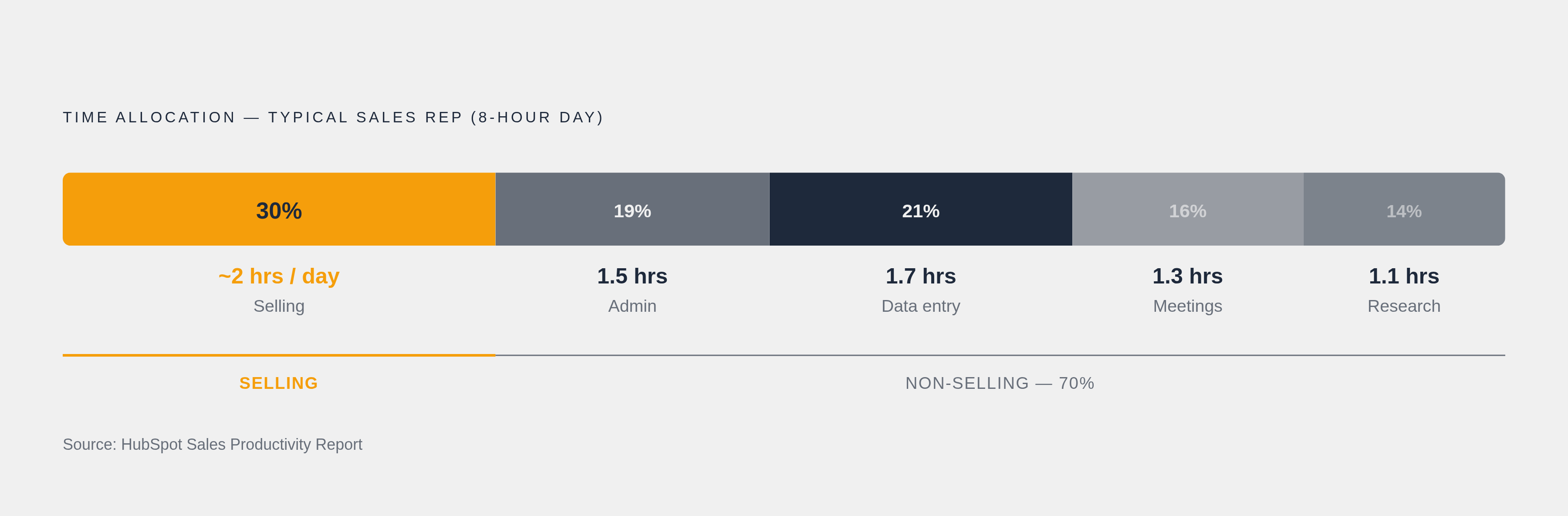
Sales reps spend only about 30% of their time actually selling — roughly two hours per day according to HubSpot. The rest disappears into admin, manual research, internal meetings, and data entry. Manual prospect research averages 7.5 minutes per lead; automated enrichment cuts that to 45 seconds. Run that math across a full outbound team and you have your first real argument for tooling.
The downstream problems are just as significant:
57% of SMBs say generating enough leads is their biggest sales challenge
42% say converting those leads is the follow-on problem
Poor follow-up and missed opportunities cost small businesses an estimated $1.8 trillion annually
Lead generation and lead conversion are two separate problems that often get conflated. Fix the lead flow without fixing conversion and you are filling a bucket with a hole in the bottom. Prospecting and enrichment tools address the first problem; pipeline and engagement tools address the second. Buying automation for the wrong stage moves neither number.
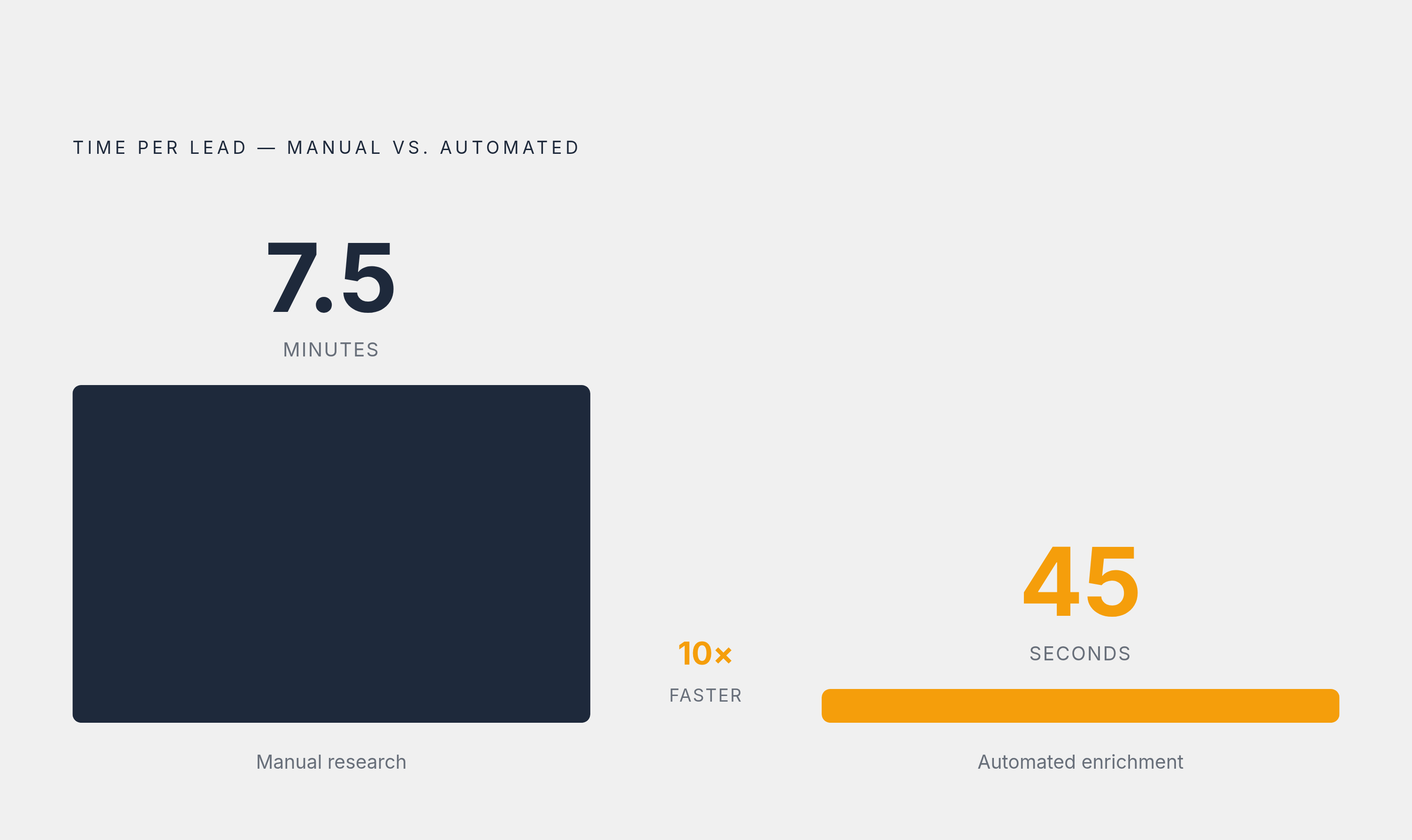
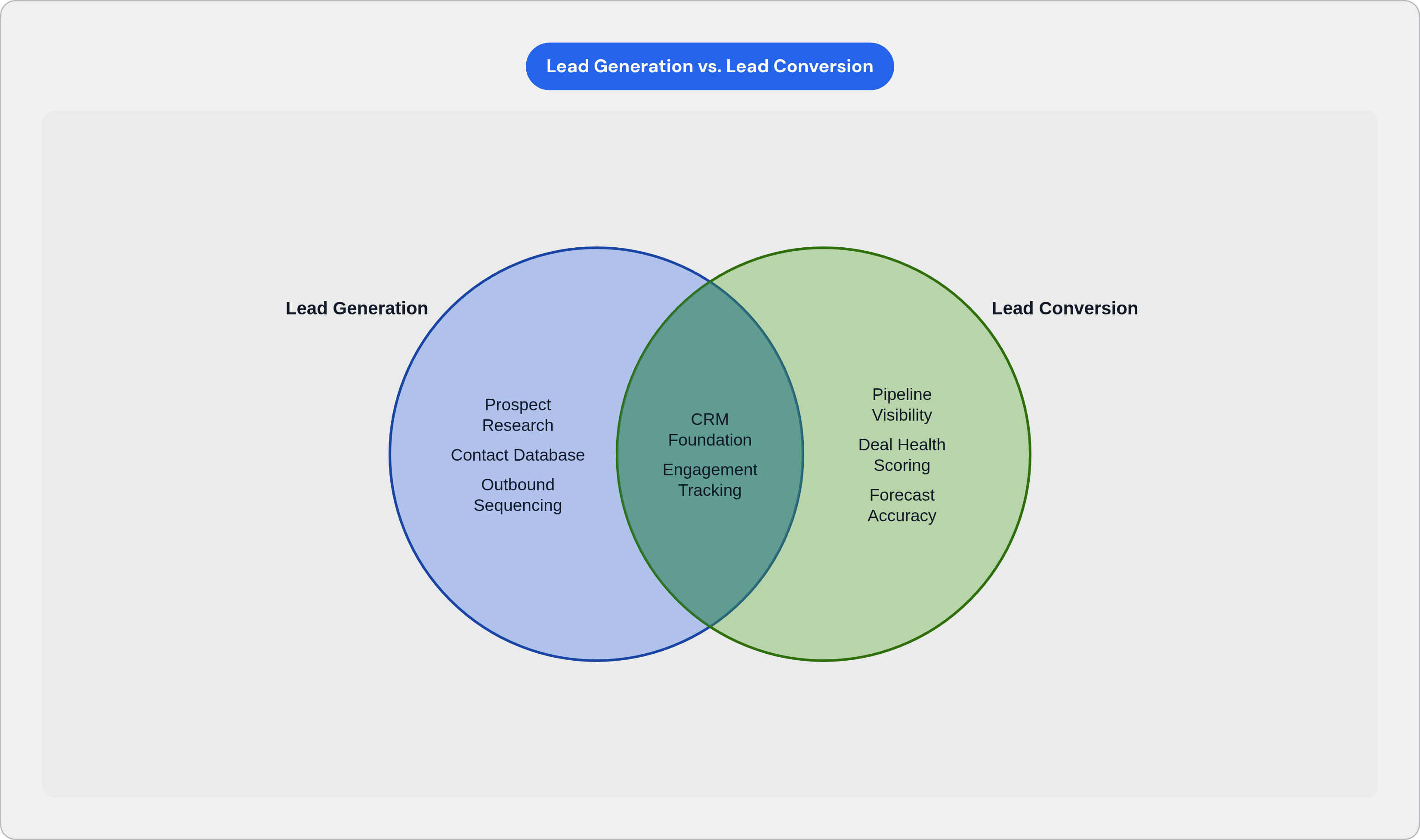
Figure Out What Your Team Actually Needs Before You Look at a Single Tool
Three filters worth running before you open a product demo:
Team size and seat economics. Per-seat pricing compounds fast. What looks like a reasonable monthly expense at five seats becomes a significant line item at thirty.
Sales motion. Outbound teams need different infrastructure than inbound-heavy teams managing high-volume pipelines. A product-led growth motion is different again. The same CRM cannot serve all three equally well.
Operational maturity. Does your team have a dedicated CRM admin or RevOps function, or is the sales manager doing data entry between calls? This single question eliminates half the market immediately.
There is also a feature adoption problem worth naming. Over 4 in 10 CRM users use half or fewer of their tool's features, and 22% of sales professionals are unsure what a CRM actually does or how to use it well. Buying for features a team will never reach is the specific mechanism by which expensive tools fail — not bad software, but bad fit.
Here is roughly how requirements map by team size:
Very small teams (under 10 reps): Low setup cost, fast time-to-value, minimal admin overhead
Growing teams (10–50 reps): Automation, sequencing, light reporting. Per-seat costs start to matter here.
Mid-size teams (50–200 reps): Reporting depth, manager visibility, integration into a broader RevOps stack
All-in-one tools reduce sprawl and integration headaches. Best-of-breed tools can outperform in a specific job. The right answer depends on those three filters.
CRM as the Foundation Every Other Tool Depends On
Every other tool in this piece assumes a CRM is already doing its job. When it is not, the rest of the stack is expensive scaffolding around a hole.
The adoption numbers make a strong case for the category:
Over 91% of companies with more than 10 employees use CRM software
Businesses using CRM see roughly 27% higher customer retention
Nearly half of users report major improvements in customer satisfaction after adoption
Data accessibility from CRM can shorten sales cycles by 8 to 14%
Between 20% and 70% of CRM projects fail, and the leading cause is almost always poor adoption — software that did not match how the team actually works. About 27% of small businesses delay adoption entirely because the implementation burden turns out to be larger than expected.
What to prioritize by team size:
Very small teams: Free or low-cost tier, fast setup, minimal configuration required
Growing teams: Automation and email sequencing built in or tightly integrated, usage reporting for managers
Mid-size teams: Reporting depth, role-based access, CRM admin tooling, native integration with the rest of the stack
Lead generation and lead conversion are two separate problems that often get conflated.
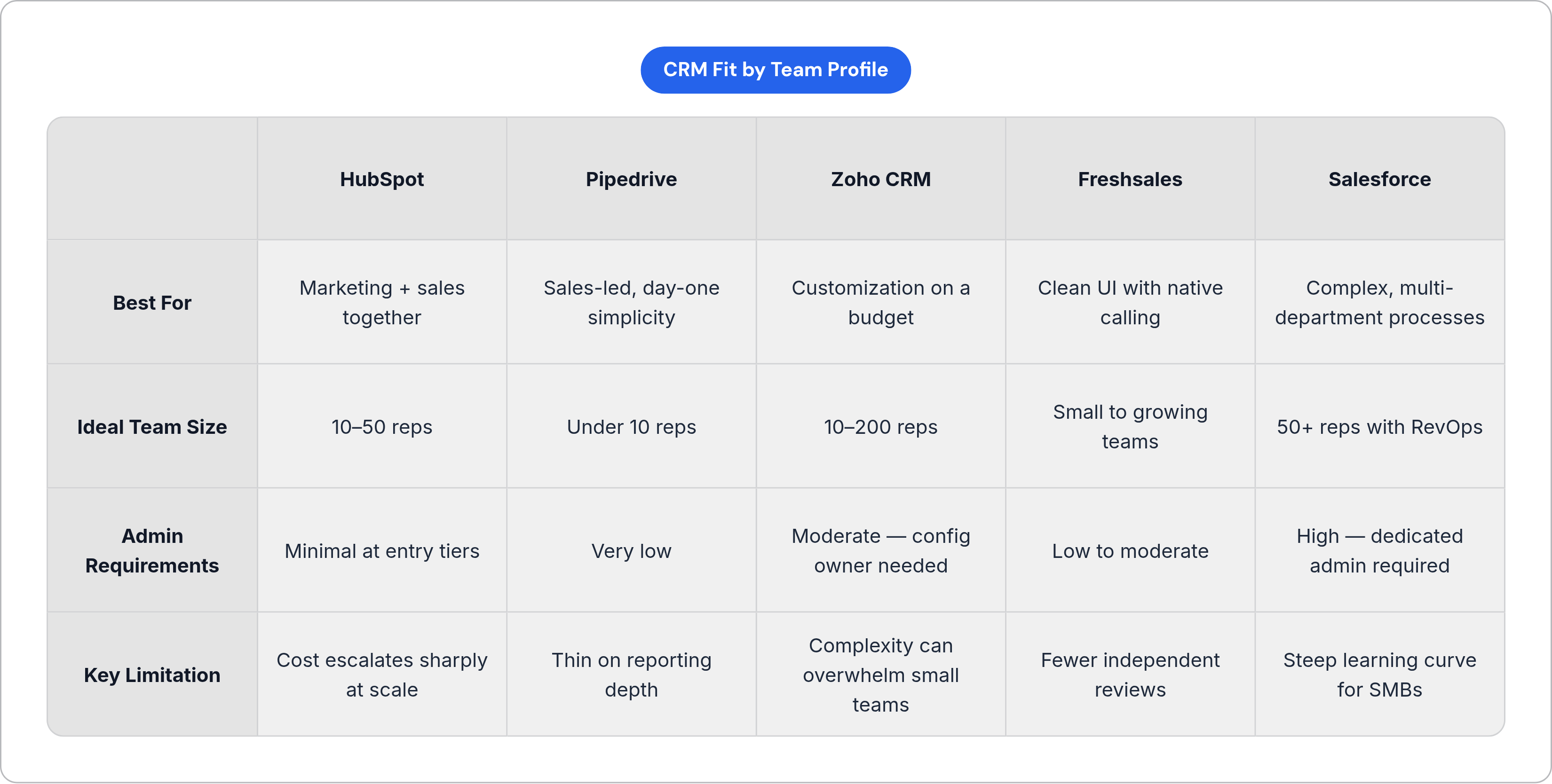
Which CRM Fits Which Team: HubSpot, Pipedrive, Zoho, Freshsales, and Salesforce Compared
HubSpot Sales Hub
Best for: SMBs scaling marketing and sales together, teams that want one system connecting both functions.
HubSpot's free CRM tier costs nothing, supports unlimited users, and handles up to one million contacts. The Starter plan runs $15 per seat per month. Built-in AI handles lead scoring, email drafting, and pipeline forecasting. Automation and sequences come at higher tiers.
The most consistent complaint is cost escalation: teams hit the free plan's ceiling faster than expected, often right as they have momentum and feel committed to the platform.
Size fit: Strongest for growing teams (10–50 reps) where marketing and sales share the same pipeline. Less compelling for pure outbound teams with no use for HubSpot's marketing infrastructure.
Pipedrive
Best for: Sales-led teams that need reps productive on day one with no training budget and no admin.
The visual, pipeline-first design earns Pipedrive some of the highest ease-of-use ratings in the category. There is a 14-day free trial, and entry tiers are priced accessibly for small teams billed annually. Pipedrive is strong for pipeline management and noticeably thinner on deep customization and reporting — teams typically feel this when reporting requirements increase.
Size fit: Very small to growing teams.
Zoho CRM
Best for: Cost-conscious teams that want strong customization and AI capabilities without HubSpot's pricing ladder.
Zoho's free plan supports up to three users. Paid tiers span a wider pricing range than any other option in this group. The customization depth is a real differentiator, but that same depth is the primary usability complaint: it can overwhelm small teams without someone available to configure it. Review data also flags recurring complaints about support responsiveness, which matters when a team has no internal CRM expertise.
Size fit: Growing to mid-size teams (10–200 reps) that have someone capable of owning configuration. Not a good first CRM for a team with no admin capacity.
Freshsales
Best for: Teams that want a cleaner interface than Zoho at a comparable price, with built-in calling and email.
Freshsales combines contact management, automation, native calling, and email in one platform. It is part of the Freshworks suite, which matters if a team already uses other Freshworks products. It earns serious consideration when the Freshworks ecosystem is already in play.
Size fit: Small to growing teams.
Salesforce
Salesforce holds roughly 21% of total CRM market share globally, reflecting enterprise adoption rather than SMB fit. Reviewers consistently flag a steep learning curve and significant admin requirements. Smaller teams without a dedicated CRM admin regularly find the setup and maintenance burden larger than anticipated.
Salesforce makes sense when complex processes span multiple departments, deep customization is non-negotiable, and the team has dedicated admin or RevOps capacity. For most teams under 50 reps, the other options in this section handle the same core jobs with considerably less overhead.
Quick Sizing Summary
| Team Profile | Recommended Starting Point | |---|---| | Very small teams starting out | HubSpot free tier or Pipedrive | | Growing teams needing automation | HubSpot Starter or Pipedrive Growth | | Mid-size teams needing reporting depth | Zoho Professional or HubSpot Professional | | Teams with RevOps and complex requirements | Salesforce |
Sales Engagement and Prospecting Tools for Teams Doing Active Outbound
A CRM manages existing contacts and pipeline. A sales engagement platform handles the systematic outreach that fills that pipeline. Using a CRM for both jobs typically means doing neither well.
Apollo.io
Apollo combines a contact database, enrichment, sequencing, a dialer, and analytics in one platform. For a small team with no ops person, that consolidation is a meaningful advantage — fewer tools to buy, integrate, and maintain. The database is substantial, and a free plan covers basic prospecting, with paid tiers stepping up through Basic and Professional.
SMB verdict: The strongest option for teams that need prospecting data, enrichment, sequencing, and calling without managing multiple vendors.
Limitations: User complaints around support responsiveness, credit-based pricing that can be hard to forecast, and occasional data quality gaps. Pilot it before committing.
Outreach
Outreach is a stronger fit when a team has mature RevOps, meaningful Salesforce complexity, and manager-level reporting requirements that Apollo does not fully address. Pricing requires a quote. For teams under roughly 50 reps without a RevOps function, the procurement and setup overhead tends to outweigh the governance advantages Outreach provides.
All-in-One vs. Best-of-Breed for Outbound Teams
Small teams benefit most from Apollo's consolidated approach. Fewer tools means fewer integration failures and less context switching for reps.
Mid-size teams with existing Salesforce investment may find Outreach's depth and governed workflows worth the added complexity.
Teams sitting between those two states should assess honestly whether anyone has capacity to own and maintain a more complex stack before committing.
Pipeline Visibility and Forecasting Tools Once a Team Has Volume to Manage
This category becomes worth paying for when managers are spending more time in one-on-ones asking reps where deals stand than coaching them on how to close. Before that point, a well-used CRM is sufficient.
What pipeline and forecasting tools provide that a basic CRM does not:
Deal health scoring based on activity signals, not just manual stage updates from reps
Forecast accuracy that accounts for rep bias (sandbagging, overconfidence) without requiring a manager to manually correct every number
Manager visibility into which reps need coaching versus which deals need intervention
Most CRMs show you where a deal sits in the stage. Forecasting tools tell you whether that stage is actually accurate. When weekly pipeline reviews can no longer keep up with volume, that is when this category earns its budget. Get the CRM right, get the prospecting motion right, then add visibility tooling once there is actually something worth seeing.
Notes
- https://blog.salesflare.com/compare-salesforce-zoho-hubspot-pipedrive
Provided comparative details on HubSpot, Pipedrive, Zoho, and Salesforce including pricing, ease of use, and fit by team size.
- https://attrock.com/blog/hubspot-vs-zoho-vs-pipedrive/
Supported the CRM comparison section covering HubSpot, Zoho, and Pipedrive strengths, limitations, and team-size fit.
- https://mooloo.net/articles/business-entrepreneurship/top-crm-platforms-for-small-teams-hubspot-vs-zoho-vs-pipedrive/
Contributed details on CRM options for small teams including Zoho's free plan user limit and HubSpot's free tier contact capacity.